Turn your photo into anime
KivoHeadShots turns a photo into an anime illustration: upload it, choose an anime-film, classic, modern or chibi style, and keep the same pose, clothes and setting. It costs from 5 credits a run, and new accounts get 10 free credits.
From 5 credits per run
What you need to turn a photo into anime
- Your photo
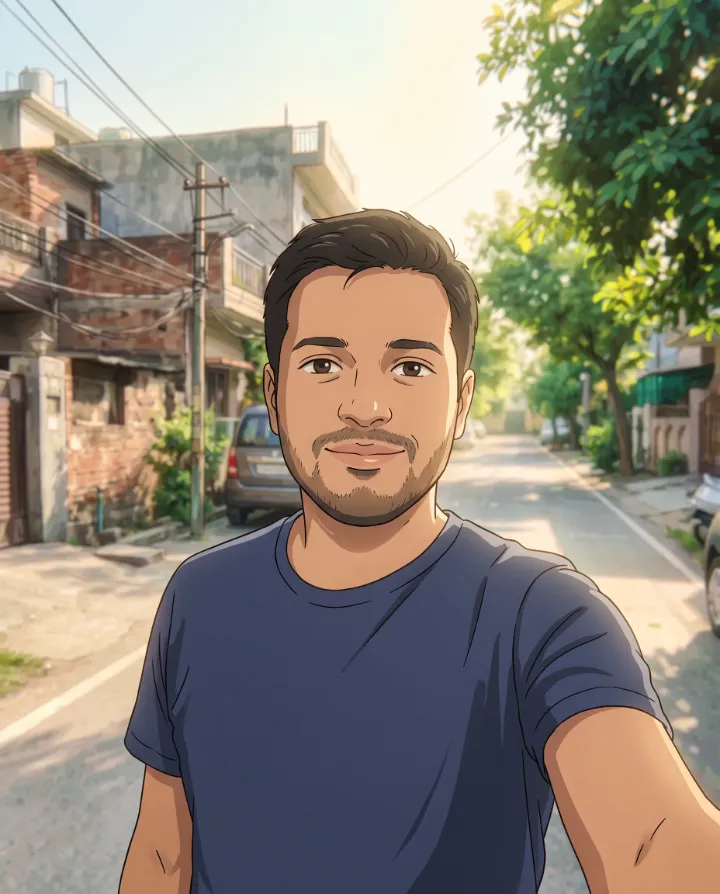
Example: turn a photo into anime
Made with Photo to Anime on this site from a photo of an AI-generated person, not a real customer. Your results depend on your photos and settings.

Why use our photo to anime converter
Redraw any photo as an anime illustration: an anime-film look, classic 90s anime, modern anime or cute chibi.
- Four anime styles
- Keeps your pose, clothes and setting
- Works with people, pets and places
How to turn a photo into anime
- 1
Upload 1–4 photos of yourself, or describe an image from scratch.
- 2
Choose a scene and how many photos you want.
- 3
Download your new photos, usually within a minute or two.
Your uploads are deleted as soon as the run finishes, and never used to train AI. How we protect your photos
Questions about the photo to anime converter
- Can I get the look of a famous anime studio?
- We describe styles in general terms rather than copying a particular studio or artist. Pick the style closest to what you want.
- Can I use the photos commercially?
- Photos of yourself are yours to use. Don't upload photos of other people without their permission.
- Why do some results look different from me?
- AI isn't perfect. Clear, front-facing photos in good light work best. Try again with different photos if a result misses.
More photo generator tools
- AI Image GeneratorDescribe any picture and get it in seconds.
- AI Saree PhotosSaree portraits in 20 styles, from Banarasi silk to bridal red.
- Christmas PhotosFestive holiday portraits without the photo-studio queue.
- Graduation PhotosCap-and-gown portraits to celebrate the big day.
- Yearbook PhotosClassic school-yearbook portraits, from 90s retro to today.
- Summer PhotosSun-soaked summer shots for your feed.