Photo Restoration
Restore old and damaged photos
KivoHeadShots restores old and damaged photos with AI: it repairs scratches and tears, brings back faded colour, and can increase the resolution. It costs from 5 credits a run, and new accounts get 10 free credits.
Try Photo Restoration
From 5 credits per run
What you need to restore an old photo
- Your photo
Example: restore an old photo
Made with Photo Restoration on this site from a photo of an AI-generated person, not a real customer. Your results depend on your photos and settings.
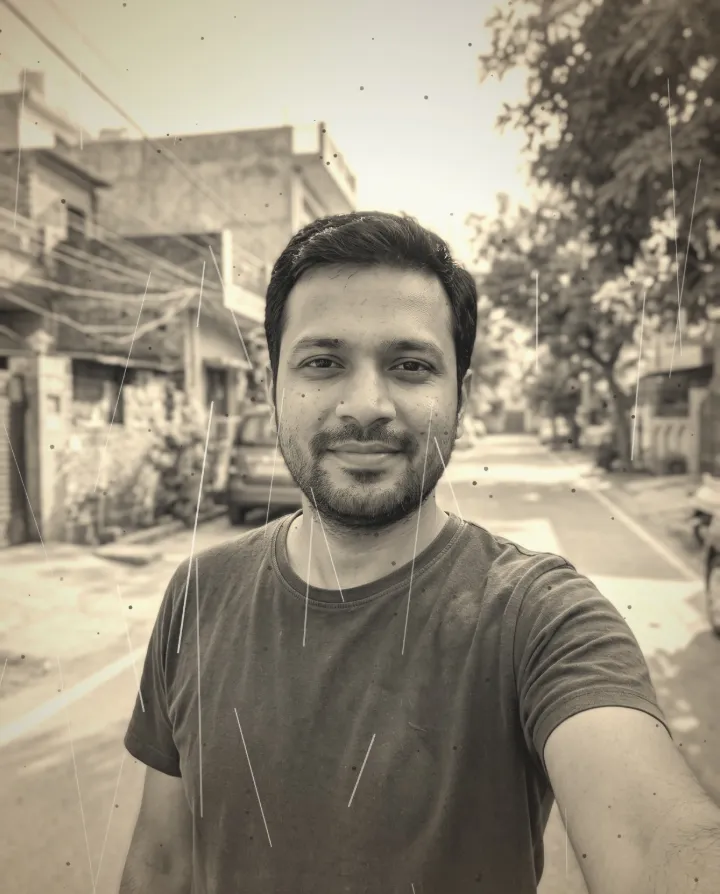

Why use our AI photo restoration tool
Repair scratches, dust, tears and faded colour in old family photos, scans or phone pictures of prints.
- Removes scratches and dust
- Brings back faded colours
- Sharpens soft, aged detail
How to restore an old photo
- 1
Upload the photo you want to fix or change.
- 2
Choose the options, or paint the area for tools like Magic Eraser.
- 3
Download the edited photo in full quality.
Your uploads are deleted as soon as the run finishes, and never used to train AI. How we protect your photos
Questions about the AI photo restoration tool
- What's the best way to scan an old photo?
- A flatbed scan is best. A phone photo works too: shoot straight on, in even daylight, without glare.
- What file types work?
- JPG, PNG and WebP. Large photos are resized to 2048 pixels on the longest side before upload, which also removes location data.
- Do you keep my original photo?
- No. Uploaded photos are deleted as soon as your result is ready. Results stay in your account until you delete them.
More photo editor tools
- Image UpscalerIncrease resolution up to 4K without the blur.
- Magic EraserPaint over objects, people or blemishes and they disappear.
- Unblur ImageRescue shaky, out-of-focus or soft photos.
- Photo EnhancerCrisper detail, cleaner texture and better overall quality in one click.
- Bokeh EffectBlur the background like a professional portrait lens.
- Hair Style EditorTry a new haircut or style before you book the appointment.