Residency application photos (ERAS)
KivoHeadShots makes residency (ERAS) application photos from 1–4 selfies: a business suit, white coat or scrubs on a plain white, grey or hospital background. It costs from 5 credits a run, and new accounts get 10 free credits.
From 5 credits per run
What you need to make a residency application photo
- 1–4 photos of yourself
Example: make a residency application photo
Made with Residency Headshots on this site from a photo of an AI-generated person, not a real customer. Your results depend on your photos and settings.
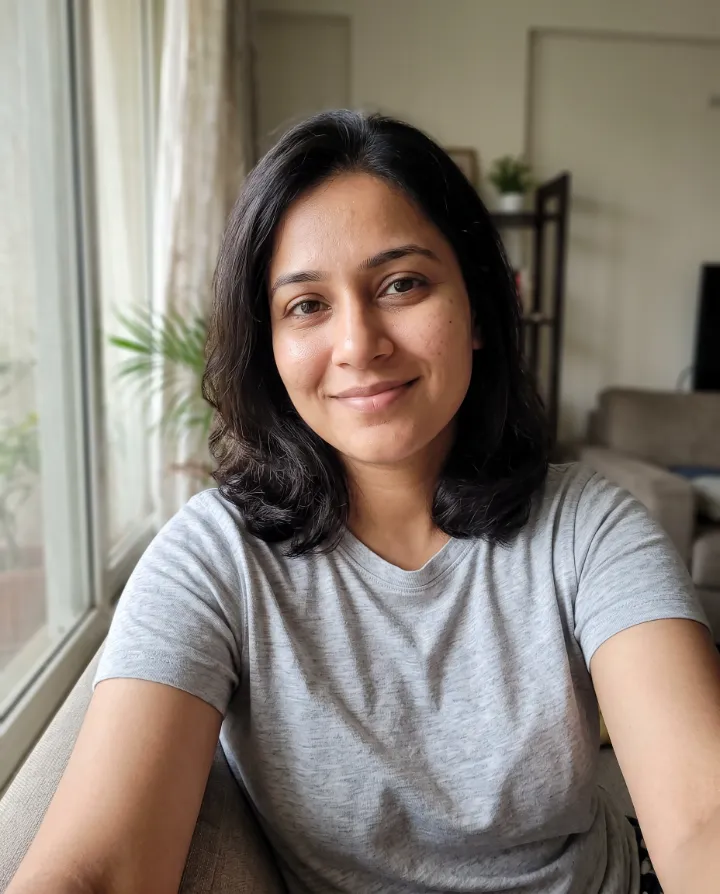
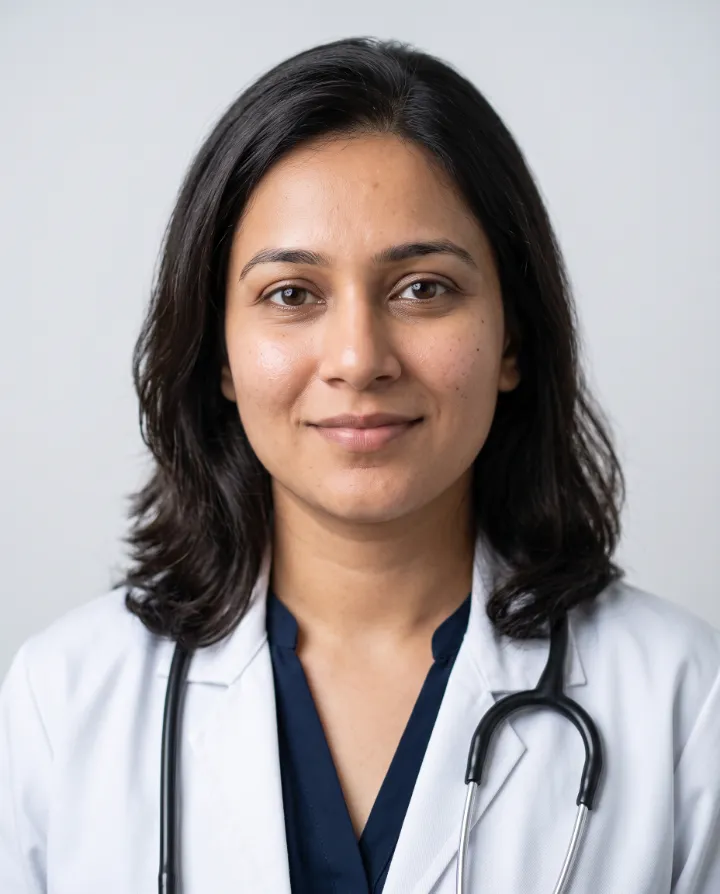
Why use our residency photo generator
Clean, professional photos for medical residency applications: a business suit or white coat on a plain, neutral background.
- Plain white or grey backgrounds
- Suit, white coat or scrubs
- Calm, approachable expression
Outfit, background and cost
What should I wear for a residency application photo?
You choose the outfit in the tool, so you don't need to change clothes for your selfies. The outfits are: Business suit, white coat, shirt and tie, white coat and blouse and scrubs. A business suit is the safe default. A white coat over a shirt and tie, or over a blouse, signals medicine at a glance; scrubs look less formal.
Which background is best for a residency application photo?
The backgrounds are: Plain white, light grey studio and hospital corridor. Plain white or light grey looks like a standard application photo. A hospital corridor feels more personal, for a profile rather than a form.
Does it meet ERAS photo requirements?
Check your programme's current guidance. Most ask for a recent, professional, head-and-shoulders photo on a plain background, which is what the white and grey settings produce. Pick a result that looks exactly like you.
How much does it cost in rupees?
Each headshot costs 5 credits, about ₹10 at the Standard pack's price. A run of 1, 2 or 4 headshots costs 5, 10 or 20 credits, and new accounts get 10 free credits, enough for 2 headshots.
How long does it take?
Usually a minute or two after you start. You can leave the page: the headshots appear in your History when they're ready.
How to make a residency application photo
- 1
Upload 1–4 clear selfies. Different angles help the AI learn your face.
- 2
Pick an outfit and background that suit your profession.
- 3
Get your headshots in a few minutes and download your favourites.
Your uploads are deleted as soon as the run finishes, and never used to train AI. How we protect your photos
Questions about the residency photo generator
- Does this meet ERAS photo requirements?
- Check your programme's current guidance. Most ask for a recent, professional, head-and-shoulders photo on a plain background, which is what the white and grey settings produce.
- What photos should I upload?
- Clear, well-lit photos where your face is easy to see: no sunglasses, hats or heavy filters, and nobody else in the shot. Phone selfies are fine. Different angles and expressions give better results.
- Will it look like me?
- The AI is instructed to keep your face, skin tone, age and features exactly as they are. Results vary from photo to photo, so we generate several and you keep the ones you like.
More headshots tools
- Professional HeadshotsStudio-quality business headshots from a few selfies.
- Real Estate HeadshotsWarm, trustworthy agent photos for listings, signs and business cards.
- LinkedIn HeadshotsA friendly, polished profile photo that fits LinkedIn's square crop.
- Resume Photo MakerA clean, professional photo for your résumé or CV, from a few selfies.
- Headshots for TeamsMatching headshots for your whole team, managed from one account.
- Lawyer HeadshotsAuthoritative, firm-ready portraits for attorney bios and directories.